

ASUS ROG MAXIMUS Z890 APEX Motherboard

✅ In Stock
🚚 Ships in 24–48 hours

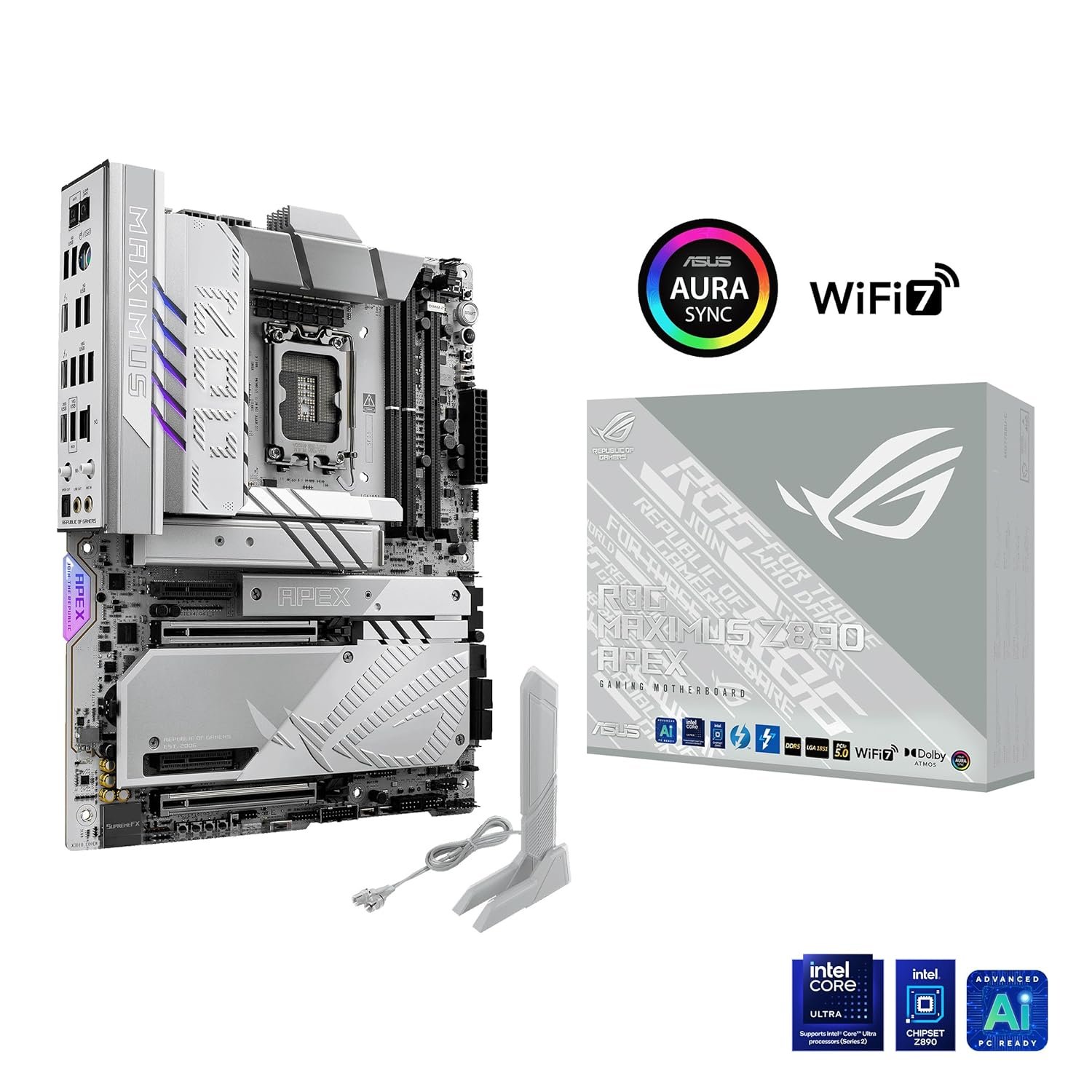
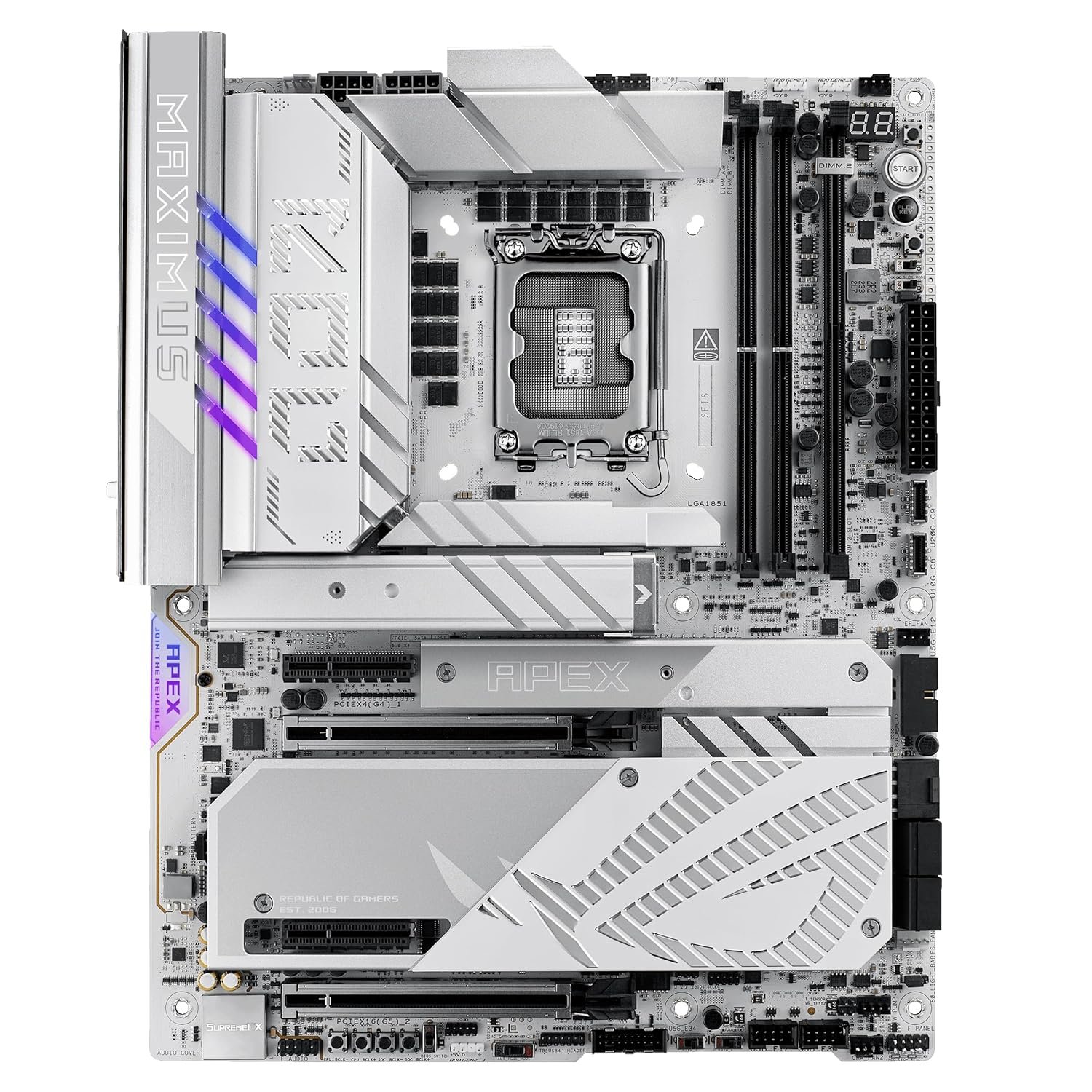
ROG Maximus Z890 APEX The ROG Maximus Z890 Apex fully supports Intel(R) Core(TM) Ultra processors (Series 2). Precision-engineered for supreme overclocking, it carries the legacy of the series forward into a new generation. With exceptional power delivery and a two-slot DDR5 memory layout, overclockers can meet and exceed their ambitions for record-breaking CPU and memory performance. For those who favor lighter colors for the aesthetics of their build, the ROG Maximus Z890 Apex features a cobble-gray surface, polished metallic accents, sleek contours and a predominantly silver palette. Click to check our Z890 Motherboards Guide

Build Includes

PRODUCT OVERVIEW

CPU: “Support Intel(R) Core(TM) Ultra Processors(Series 2) , LGA1851

Supports Intel(R) Turbo Boost Technology 2.0 and Intel(R) Turbo Boost Max Technology 3.0**
* Refer to https://www.asus.com/support/download-center/ for CPU support list.
** Intel(R) Turbo Boost Max Technology 3.0 support depends on the CPU types.
Chipset”
Chipset: “Intel(R) Z890 Chipset”
Memory: “Support up to 9066+MT/s (OC), Non-ECC, Un-buffered ,Clocked Unbuffered DIMM (CUDIMM)*
Dual channel memory architecture

Supports Intel(R) Extreme Memory Profile (XMP) memory module

Supports DIMM Flex

Supports DIMM FIT

ASUS Enhanced Memory Profile III (AEMPIII)
* Supported memory types, data rate (speed), and number of DRAM modules vary depending on the CPU and memory configuration, for more information please refer to CPU/Memory Support list under the Support tab of product information site or visit https://www.asus.com/support/download-center/.
* Non-ECC, un-buffered DDR5 memory supports On-Die ECC function.”
Graphics: “2 x Intel(R) Thunderbolt(TM) 4 ports (USB Type-C(R)) support DisplayPort and Thunderbolt(TM) video outputs****
* Graphics specifications may vary between CPU types. Please refer to www.intel.com for any updates.
**In Thunderbolt4TM mode, supports up to 8K@60Hz x1 with DSC or 4K@60Hz x 2, maximum total bandwidth up to 23.8Gbps or 16Gbps/16Gbps, for resolution support please check DisplayPort 2.1 specs.
***In DP alt mode, Only one USB Type-C(R) port supports up to UHBR20 at a time.
**** VGA resolution support depends on processors’ or graphic cards’ resolution.
*****While installing the operating system, please ensure that your monitor is connected to a discrete graphics card.

Expansion Slots: “Support Intel(R) Core(TM) Ultra Processors(Series 2) *
2 x PCIe 5.0 x16 slots (supports x16 or x8/x8 or x8/x4/x4 modes)**
Intel(R) Z890 Chipset
2 x PCIe 4.0 x4 slots
* Please check the PCIe bifurcation table on the support site (https://www.asus.com/support/FAQ/1037507/).
** M.2_3 & M.2_4 share bandwidth with PCIEX16(G5)_2. When M.2_3 is enabled, PCIEX16(G5)_1 will run x8 & PCIEX16(G5)_2 will run x4. When M.2_3 & M.2_4 are enabled, PCIEX16(G5)_1 will run x8 & PCIEX16(G5)_2 will disabled.
– To ensure compatibility of the device installed, please refer to https://www.asus.com/support/download-center/ for the list of supported peripherals.

Storage: “Total supports 6 x M.2 slots and 4 x SATA 6Gb/s ports*
Support Intel(R) Core(TM) Ultra Processors(Series 2) *
M.2_1 slot (Key M), type 2242/2260/2280/22110 (supports PCIe 5.0 x4 mode)
M.2_2 slot (Key M), type 2242/2260/2280 (supports PCIe 4.0 x4 mode)
M.2_3 slot (Key M), type 2242/2260/2280 (supports PCIe 5.0 x4 modes)**
M.2_4 slot (Key M), type 2242/2260/2280 (supports PCIe 5.0 x4 modes)**
Intel(R) Z890 Chipset

DIMM.2_1 slot (Key M) via ROG DIMM.2, type 2230/2242/2260/2280/22110 (supports PCIe 4.0 x4 mode)
DIMM.2_2 slot (Key M) via ROG DIMM.2, type 2230/2242/2260/2280/22110 (supports PCIe 4.0 x4 mode)
4 x SATA 6Gb/s ports
* Intel(R) Rapid Storage Technology supports PCIe RAID 0/1/5/10, SATA RAID 0/1/5/10, M.2 slot from CPU only supports RAID 0/1/5.
**M.2_3 & M.2_4 share bandwidth with PCIEX16(G5)_2. When M.2_3 is enabled, PCIEX16(G5)_1 will run x8 & PCIEX16(G5)_2 will run x4. When M.2_3 & M.2_4 are enabled, PCIEX16(G5)_1 will run x8 & PCIEX16(G5)_2 will disabled.

Ethernet: 1 x Realtek 5Gb Ethernet ASUS LANGuard

Wireless & Bluetooth: “*Wi-Fi features may vary depending on the operating system

For Windows 11, Wi-Fi 7 will require 24H2 or later version for full functions, Windows 11 21H2/22H2/23H2 only supports Wi-Fi 6E.
For Windows 10, only Wi-Fi 6 is supported.
** Wi-Fi 6GHz frequency band and bandwidth regulatory may vary between countries.
*** The Bluetooth(R) version may vary, please refer to the Wi-Fi module manufacturer’s website for the latest specifications.”
USB: “Rear USB (Total 11 ports)
2 x Thunderbolt(TM) 4 ports (2 x USB Type-C(R))
1 x USB 20Gbps port (1 x USB Type-C(R))
4 x USB 10Gbps ports (4 x Type-A)
4 x USB 5Gbps ports (4 x Type-A)
Front USB (Total 10 ports)
1 x USB 20Gbps connector (supports USB Type-C(R) with up to 60W PD/QC4+)*
1 x USB 10Gbps connector (supports USB Type-C(R))
2 x USB 5Gbps headers support 4 additional USB 5Gbps ports
2 x USB 2.0 headers support 4 additional USB 2.0 ports

USB Type-C(R) power delivery output: max. 5V/3A
*USB Type-C(R) power delivery output: 5/9/15/20V max. 3A, PPS:3.3?21V max. 3A”
Audio: “””ROG SupremeFX 7.1 Surround Sound High Definition Audio CODEC ALC4080*
– Impedance sense for front and rear headphone outputs
– Supports: Jack-detection, Multi-streaming, Front Panel MIC Jack-retasking
– High quality 120 dB SNR stereo playback output and 110 dB SNR recording input
– Supports up to 32-Bit/384 kHz playback on front panel””
Audio Features
– SupremeFX Shielding Technology
– Savitech SV3H712 AMP
– Gold-plated audio jacks
– Rear optical S/PDIF out port
– Premium audio capacitors
– Audio cover
* A chassis with an HD audio module in the front panel is required to support 7.1 Surround Sound audio output.
** The LINE OUT port on the rear panel does not support spatial audio. If you wish to use spatial audio, make sure to connect your audio output device to the audio jack on the front panel of your chassis or use a USB interface audio device.”
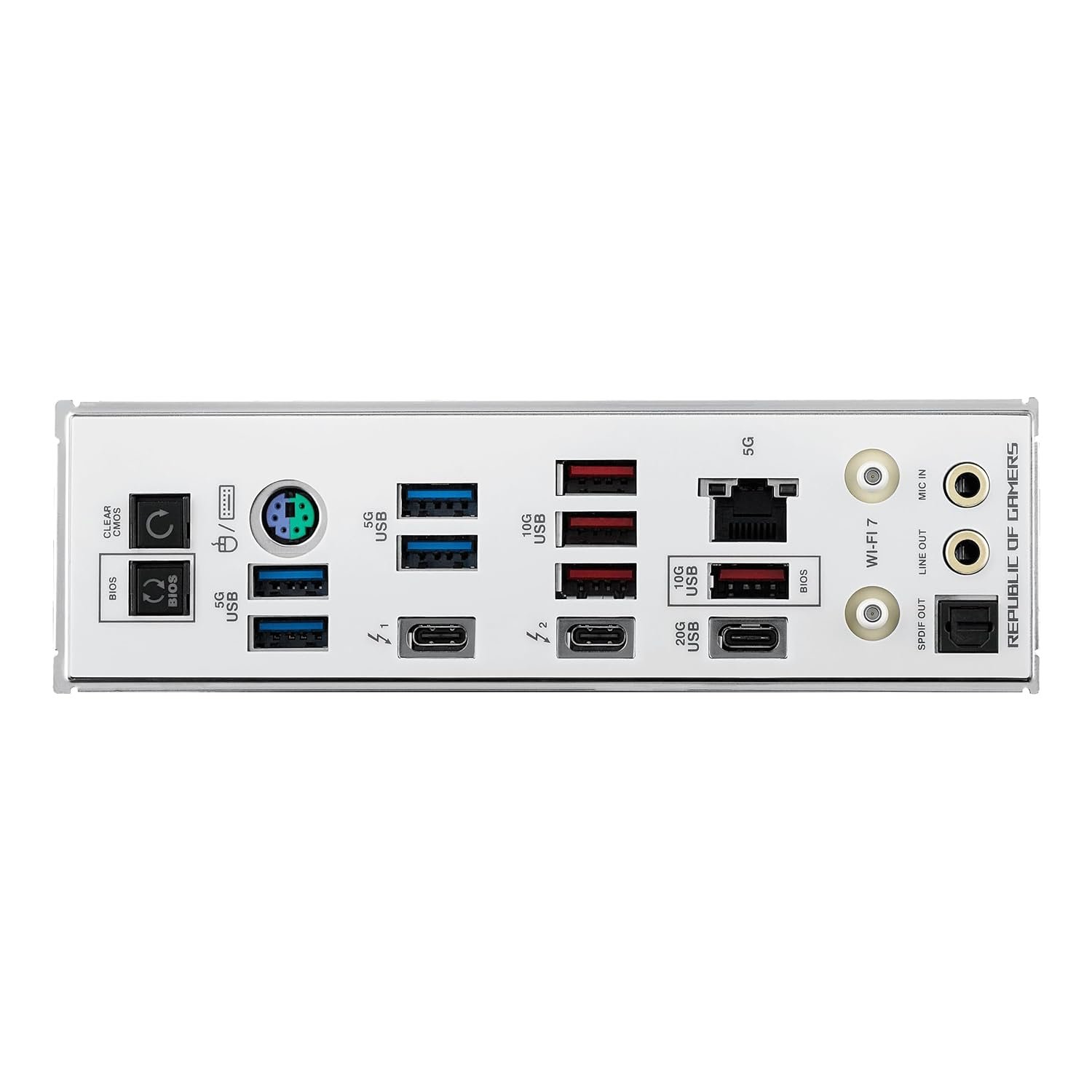
Back Panel I/O Ports: “2 x Thunderbolt(TM) 4 ports (USB Type-C(R))
1 x USB 20Gbps port (1 x USB Type-C(R))
4 x USB 10Gbps ports (4 x Type-A)
4 x USB 5Gbps ports (4 x Type-A)
1 x Wi-Fi Module
1 x Realtek 5Gb Ethernet port
2 x Gold-plated audio jacks
1 x Optical S/PDIF out port
1 x BIOS FlashBack(TM) button
1 x Clear CMOS button
1 x PS/2 keyboard/mouse combo port”
Internal I/O Connectors: ” Connectors

Fan and Cooling related
1 x 4-pin CPU Fan header
1 x 4-pin CPU OPT Fan header
1 x 4-pin AIO Pump header
2 x 4-pin Chassis Fan headers
2 x 4-pin Full Speed Fan headers
1 x W_PUMP+ header
1 x Extra Flow Fan header

Power related
1 x 24-pin Main Power connector
2 x 8-pin +12V Power connector
1 x 8-pin PCIe Power connector

Storage related
4 x M.2 slots (Key M)
1 x DIMM.2 slot supports 2 x M.2 slots (Key M)
4 x SATA 6Gb/s ports

USB
1 x USB 20Gbps connector (supports USB Type-C(R))
1 x USB 10Gbps connector (supports USB Type-C(R))
2 x USB 5Gbps headers support 4 additional USB 5Gbps ports
2 x USB 2.0 headers support 4 additional USB 2.0 ports

Miscellaneous
1 x 80 Light Bar jumper
3 x Addressable Gen 2 headers
1 x Alteration PCIe mode switch
4 x BCLK button
1 x BIOS Switch button
1 x FlexKey button
1 x Front Panel Audio header (F_AUDIO)
1 x LN2 Mode jumper
1 x Pause switch
18 x ProbeIt Measurement Points
1 x ReTry button
2 x RSVD switches
1 x RSVD header
1 x Safe Boot button
1 x Slow Mode switch
1 x Start button
1 x 10⁻¹ pin System Panel header
1 x Thermal Sensor header
1 x Thunderbolt(TM) (USB4(R)) header*
*The Thunderbolt(TM) card can only be used when installed to the PCIEX4(G4)_2 slot.
Ensure to install your Thunderbolt(TM) card to the PCIEX4(G4)_2 slot”
Miscellaneous: “1 x 80 Light Bar jumper
3 x Addressable Gen 2 headers
1 x Alteration PCIe mode switch
4 x BCLK button
1 x BIOS Switch button
1 x FlexKey button
1 x Front Panel Audio header (F_AUDIO)
1 x LN2 Mode jumper
1 x Pause switch
18 x ProbeIt Measurement Points
1 x ReTry button
2 x RSVD switches
1 x RSVD header
1 x Safe Boot button
1 x Slow Mode switch
1 x Start button
1 x 10⁻¹ pin System Panel header
1 x Thermal Sensor header
1 x Thunderbolt(TM) (USB4(R)) header*
*The Thunderbolt(TM) card can only be used when installed to the PCIEX4(G4)_2 slot.
Ensure to install your Thunderbolt(TM) card to the PCIEX4(G4)_2 slot.”
Special Features: “Extreme OC Kit

FlexKey button

LN2 Mode

ProbeIt

ReTry button

Safe boot button

Start button

Slow Mode

Extreme Engine Digi+
SMD Capacitor

ASUS Q-Design
“” M.2 Q-Latch

M.2 Q-Release

M.2 Q-Slide

PCIe Slot Q-Release Slim (with PCIe SafeSlot)
Q-Antenna

Q-Code

Q-Dashboard

Q-Connector

Q-DIMM

Q-LED (CPU [red], DRAM [yellow], VGA [white], Boot Device [yellow green])
Q-Slot””
ASUS Thermal Solution
“” M.2 heatsink backplate

M.2 heatsink

VRM heatsink design””
ASUS EZ DIY
“” BIOS FlashBack(TM) button

Clear CMOS button

CPU Socket lever protector

ProCool II

Pre-mounted I/O shield

SafeSlot

SafeDIMM””
Aura Sync

Addressable Gen 2 headers

Dual BIOS
“”Front Panel USB 20Gbps with Quick Charge 4+ Support

Support: up to 60W fast charging and USB Wattage Watcher*
Output: 5/9/15/20V max. 3A, PPS:3.3?21V max. 3A

Compatible with PD3.0 and PPS
* To support 60W, please install the power cable to the 8-pin PCIe power connector or else only 27W will be supported.””

Software Features: “ROG Exclusive Software

ROG CPU-Z

Dolby Atmos

Internet Security (1-year full version)
ASUS Exclusive Software

Armoury Crate

AIDA64 Extreme (1 year full version)
Aura Creator

Aura Sync

Fan Xpert 4 (with AI Cooling II)
GameFirst

Power Saving

HWiNFO

ASUS AI Advisor

ASUS Driver Hub

ASUS GlideX

Turbo Vcore

Adobe Creative Cloud (Free Trial)
Thunderbolt(TM) Share

USB Wattage Watcher

UEFI BIOS

AI Overclocking Guide

ASUS EZ DIY

ASUS CrashFree BIOS 3

ASUS EZ Flash

ASUS UEFI BIOS EZ Mode

ASUS MyHotkey

NPU Boost”
BIOS: 2 x 256 Mb Flash ROM, UEFI AMI BIOS

Manageability: WOL by PME

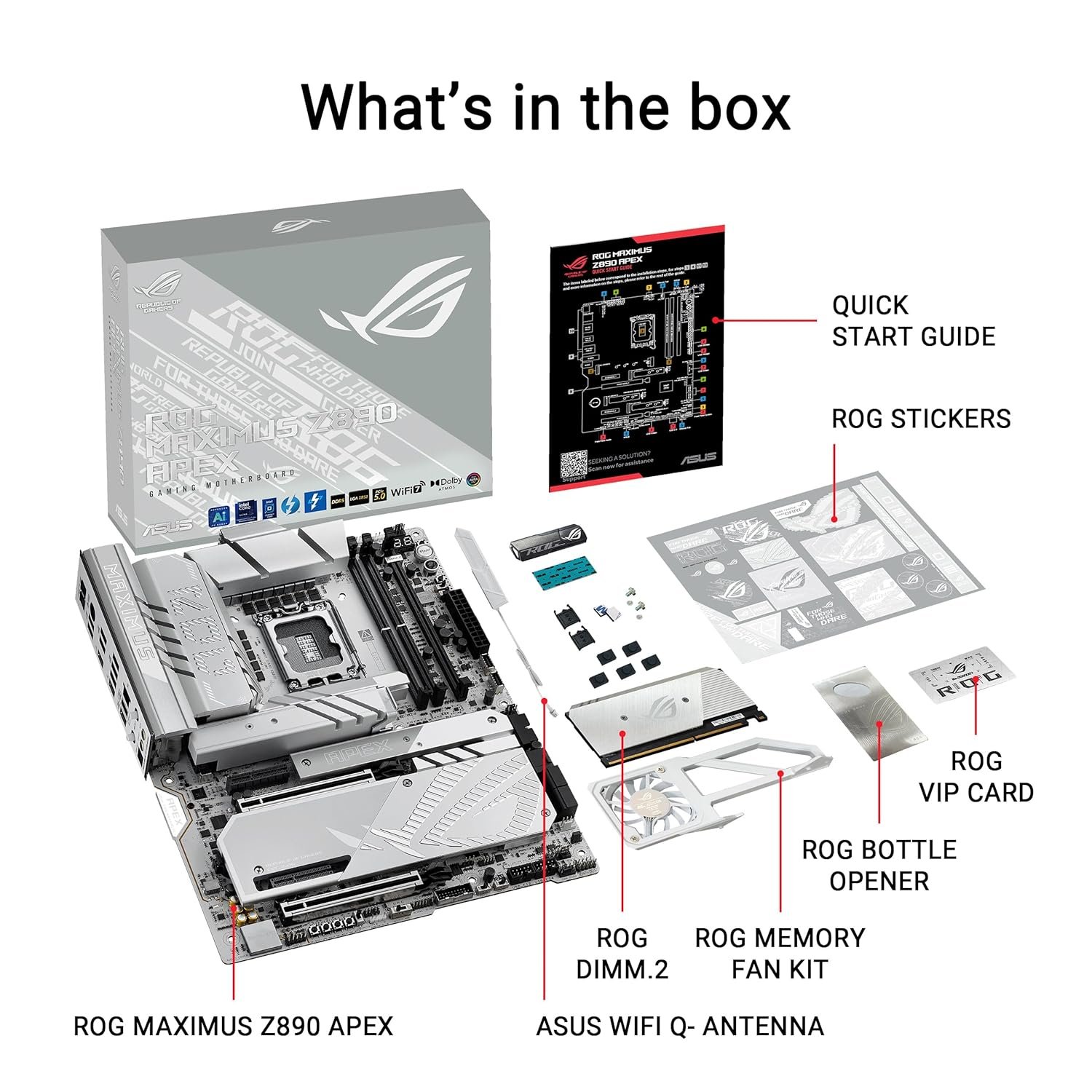
Accessories: “ROG DIMM.2 with Heatsink
“”1 x ROG DIMM.2 with heatsink
1 x M.2 pad for ROG DIMM.2
2 x M.2 screw package for ROG DIMM.2″”
Additional Cooling Kit
“”1 x Thermal pad for M.2 22110
1 x ROG Memory Fan Kit””
Miscellaneous
“”1 x ASUS WiFi Q-Antenna
1 x Q-connector
1 x ROG VIP card
3 x M.2 Q-Slide package
5 x M.2 backplate rubber packages
1 x ROG Bottle Opener””
Installation Media
1 x USB drive with utilities and drivers

Documentation
1 x Quick start guide”
Operating System: Windows 11 (22H2 & later)
Form Factor: “ATX Form Factor
12 inch x 9.6 inch ( 30.5 cm x 24.4 cm )

  • COD Available (Select Locations)
  • EMI Options via Razorpay/ICICI/HDFC
  • PAN India Shipping (3–6 Days)
  • Product Photos Sent Before Shipping

field_68ac5e6b1bd02

Scroll to Top